Lost money to a crypto or trading scam? Read this first:

If your losses exceed £3,000 (in the UK) or $10,000 worldwide The Crypto Adviser offers FREE advice on recovering your funds.

>> GET IN TOUCH
Review: Keystone Pro Hardware Wallet – Secure Your Crypto and NFTs

The world of crypto is still shrouded in mystery and many of those who bravely venture inside and buy some coins do so nervously, fearing for the security of their investment with the scare stories of high-profile hacks ringing in their ears.
Fortunately, some very clever people have designed a variety of ways to secure your treasured cryptocurrency, including air-gapped hardware wallets – a means of completely separating your coins from the web, as well as Bluetooth, WiFi, NFC and even USB.
One such cold wallet is the Keystone (formerly Cobo) – an innovative player in the crypto security space which has produced a hardware wallet designed to be a place to secure all you crypto assets, including coins such Bitcoin (BTC) and Ethereum (ETH), tokens and even NFTs (Non-Fungible Tokens).

This last part gives Keystone an edge over many of its rivals, and there are a few other features as well that make it an appealing solution to your crypto storage needs.
DISCLAIMER: Keystone were kind enough to send me a Keystone Pro hardware wallet for the purposes of this review.
Keystone Pro – at a glance
Key facts:
- Cost: £128 / $169
- Supports: 9 cryptocurrencies and a wide variety of digital tokens + NFT signing
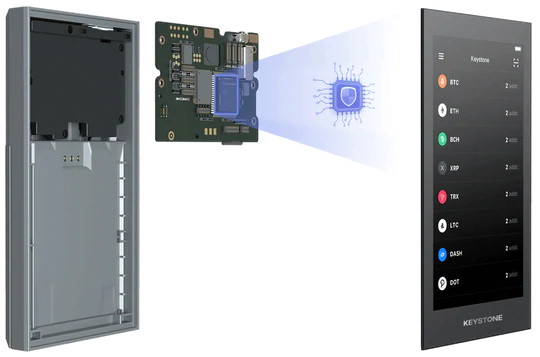
- Security: EAL 5+ proprietary bank-grade secure element. Open source firmware.
- Screen: 4-inch touchscreen
- Camera: Built-in
- Fingerprint sensor: Yes
- Size: 122 x 65 x 18mm
- Battery: Li-ion + 4xAAA pack (pro version), 4xAAA pack only (essential version)
Unboxing
The Keystone Pro arrived shrink-wrapped with two anti-tamper security seals on the product box inside which was good to see.
The Pro version of the wallet is supplied with both a Li-ion battery and an AAA battery pack. The Li-ion battery has to be removed when charging, but slots neatly in and out of the back of the unit with the help of magnets.
A charging cable is supplied but the microSD needed to upgrade the Keystone’s firmware isn’t, so you’ll need to have one handy (more on this later).

The AAA pack requires four batteries and is chunkier than the Li-ion battery, meaning the back of the Keystone is no longer flush if you’re powering it this way.
Look and feel
The Keystone wallet feels like a smallish, chunky chocolate bar but instead of being smooth around the edges I found the corners a little on the sharp side.
This means that it doesn’t feel as comfortable in the hand as its rivals, such as the ELLIPAL Titan.
With the ELLIPAL you get a satisfyingly robust aluminium alloy casing which gives it a premium feel, while the Keystone Pro feels a pit plastic-y and almost fragile.
You can opt for the Keystone Ultimate which has a full aluminium body, but there’s a huge leap in price to get the upgrade.
Also, at the time of writing the Ultimate model was sold out, with a next manufacturing date provisionally set for 2023/2024.
The Pro’s screen is nice and clear, but I found the text a little on the small side and the touchscreen interface difficult to manage because of the size of the keyboard.
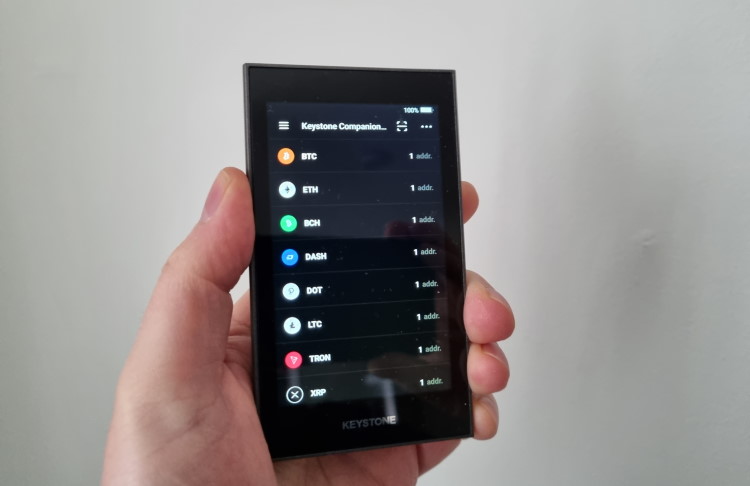
This was little problematic when entering my password, which you have to do frequently even after setting up biometrics, especially as there’s no option to keep the characters displayed when typing them.
Getting started with the Keystone Pro
You’ll need to give the Li-ion battery a charge if you’re going to be running your Keystone off this, otherwise pop four AAA batteries into the supplied battery pack and you’re ready to go.
To charge the battery you need to use the supplied USB cable and physically remove the battery from the device. It’s slightly fiddly to do but it’s designed this way to prevent any corrosion affecting the device.
One of the first things you need to do once your Keystone is charged is update the firmware.
This involves downloading the latest version from the Keystone website onto a microSD card then inserting it into the Keystone device.
On the firmware page you’re given a choice as to which version to download –either a multi-coin or Bitcoin only.
Keystone says the reason behind offering a BTC only version is based on security as there can be a slight risk when enabling altcoin support alongside Bitcoin of a complex exploit called a ‘hardware wallet coin isolation bypass’.
It would be useful to know just how much of a risk there is as many people have multiple crypto assets these days so the multi-coin firmware version is the obvious choice.
NOTE: If you decide to choose the Bitcoin only version you cannot change back to the multi-coin firmware - it is an irreversible move.
Also, the process of updating the firmware proved problematic for me and I was unable to successfully complete this step as the device returned an error message whenever I inserted the microSD card.
In an attempt to fix this, I tried using different microSD cards, different computers and formatting the cards multiple times. I also tried unzipping the installation file and recompressing it, plus using both a compressed and uncompressed version of the firmware but to no avail.
So, after a very frustrating hour, I decided to press on with getting the wallet set up without the latest firmware version.
The rest of the setup process was quite straightforward and initially involved a step to authenticate the device to ensure it hasn’t been tampered with. This meant scanning a QR code from the Keystone website and entering a code.
This was a nice touch and made me feel confident that I could safely use the device knowing that it was ‘clean’ and unsoiled by hacker’s hands.
You then need to set a password (which is fiddly, unless you’ve got toothpick fingers, because of the size of the keyboard) and make a note of the 24-word mnemonic phrase (also called a recovery seed).
It’s vitally important that you take a careful note of your mnemonic phrase and password – if you lose them you’ll lose your crypto forever.
Keystone also supplied me with the Keystone Tablet and Keystone Table Plus metal solutions for storing your recovery phrase.
These are designed to be indestructible meaning they’ll survive fire and water and other elements unlike the scrap of paper that you’ve written those vital words on!
After you’ve completed this stage you need to download the Keystone app and bind it with the wallet which involves scanning another QR code.
Using the Keystone Pro
The Keystone app is really well designed and easy to navigate. The interface is clean, logical and scores ten out of ten for usability.
Your private keys are stored on the wallet itself and will never be connect to the internet because of the air-gapped technology involved.
Receiving crypto is seamless and simply involves scanning the QR code displayed on the screen. Sending coins is slightly more complex and involves digitally signing transactions using a combination of QR code and your password.
However, you begin to realise just how secure this device is because of the various steps involved in accessing your crypto.
One function that is currently lacking from the companion app is the ability to buy or sell crypto. This would be a nice feature to see introduced at some point, alongside access to DApps.
One feature I’d also like to see is the ability to display my current crypto balance on the wallet itself, not just the app.
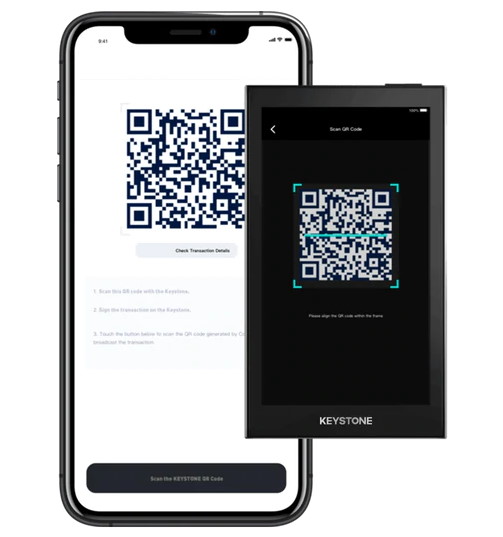
After making a few transactions you’ll soon become familiar with using the wallet and realise just how straight forward the process actually is.
The simplicity of the app combined with the security baked into the wallet design make this an ideal crypto storage solution for beginners and pros alike, especially if you’re planning the hodl your crypto for the long term.
Security features
The air-gapped nature of the Keystone wallet means that it’s impossible to get malware onto the device.
As we’ve already mentioned it has an EAL 5+ bank-grade Secure Element which generates a truly random number for the private keys.
Other features include:
- BIP32, BIP39 and BIP44 compliant open source firmware.
- Tamper-proof design which can wipe your private keys.
- Air-gapped from Bluetooth, internet, USB, WiFi and NFC.
- Password and QR code stages when signing transactions.
Advanced features
Keystone is constantly adding features to the wallet, one of which is a partnership with PancakeSwap, the decentralised exchange (DEX) built on the Binance Smart Chain which allows users to swap cryptos by accessing liquidity pools generated by users.
Due to the growing number of scammers purporting to be authentic DeFi DApps Keystone has developed a Smart Contract Metadata Registry where the ABI (Application Binary Interface) of DeFi DApps that are authentic are collected.
The ABI file can then be loaded onto the Keystone wallet enabling users to verify the authenticity of the contract they’re signing.
Keystone is working with other DeFi teams with a view to onboarding more ABIs from other DEXs. At the time of writing, Idle DAO was also partnering with the Keystone team.
NFTs are huge right now. But as the market has grown, so have the number of scammers inhabiting the NFT space.
Keystone has stepped up to tackle this and is one of the first crypto hardware wallets to enable users to protect their NFTs using their seed phrase, while also customising their wallet login screen using an NFT from their collection.
The team is also overcoming the risks of blind signing – where people trust a smart contract or watch-only wallet – when they sign a transaction on the blockchain by introducing a process where you can clearly see both the sender and receiver’s address allowing you to quickly confirm its authenticity.
Is the Keystone Pro safe?
There are some pretty hefty security features baked into this device as I’ve already mentioned, including the multi-layered self-destruct mechanism which wipes the private keys stored on the device in the event that someone tries to disassemble it.
Judging by the feedback from a number of high-profile industry commentators the Keystone wallet is an extremely safe solution.
For example, Decrypt said it was “among the safest hardware wallets available”, while Binance Academy wrote: “It’s one of the more heavy-duty solutions available on the market.”
About the company
The Keystone brand is a relaunch of the former Cobo Vault and is led by Lixin Liu.
I had a brief chat with Lixin, who is based in Shanghai, before writing this review and found him to be enthusiastic, charming and extremely passionate about the Keystone wallet and the potential it has to become the number one cold storage solution.
The team originally secured funding for the Cobo Vault Ultimate on Indiegogo in 2018.
Overall verdict
There’s a lot to like about the ELLIPAL Titan and the completely air-gapped way in which it works is a much needed step forward when it comes to cr
There’s a lot to like about the Keystone Pro – it feels incredibly secure and I’d be comfortable using it as my primary crypto hardware wallet.
While the build quality might feel slightly less durable than other hardware wallets on the market, the usability combined with the seamless integration with the well-designed app makes this a top choice for your crypto storage needs.
The Keystone Pro is simple to use, making it ideal for beginners, yet it has many advanced features – with more to come – which should satisfy the requirements of even the most hardcore crypto devotees.
The team behind Keystone is clearly ambitious and I get the impression the project is going to go from strength-to-strength in the future judging by the current developments and roadmap.
If you’re looking for an exceptionally secure, easy to use storage solution for all your crypto and NFT needs then the Keystone wallet comes highly recommended.
Related link: Trezor Model One hardware wallet review





Disclaimer: Nothing on this website constitutes financial advice. The information provided is for educational purposes only.