Lost money to a crypto or trading scam? Read this first:

If your losses exceed £3,000 (in the UK) or $10,000 worldwide The Crypto Adviser offers FREE advice on recovering your funds.

>> GET IN TOUCH
Review: ELLIPAL Titan – the Future of Crypto Hardware Wallets?

Barely a week goes by without reports of hackers stealing eye-watering sums of crypto from one exchange or another.
As a result, securing your coins should be your top priority, especially if you have a significant amount which you intend to hodl over the long term.
Hardware wallets offer a cold storage solution which moves your crypto away from a ‘hot’ exchange and putting it out of the reach of hackers.

However, many of these solutions will at some point need connecting to an internet enabled device, such as smartphone or tablet, to work which potentially exposes your coins to crooks.
The ELLIPAL Titan hardware wallet, which is works in 173 countries globally, including the UK, aims to eliminate this risk by removing the need to connect to any other device either by USB, NFC, Bluetooth, cellular or WiFi, making it a completely isolated air-gapped cold storage solution.
DISCLAIMER: ELLIPAL were kind enough to send me a Titan wallet for the purposes of this review.
ELLIPAL Titan – at a glance
Key facts:
- Cost: £105 / $139
- Supports: 41 coins and 10,000+ tokens
- Screen: 3.97-inch colour touchscreen.
- Camera: Built-in 5mpx
- Wallet size: 118 x 66 x 9.7mm
- Battery life: Up to 259 hours standby time / 1400mAh
Unboxing
The Titan arrived neatly shrink-wrapped, although the actual product box did not have a security seal which I would have liked to have seen.
The wallet comes with a charging station, USB cable and a 16GB microSD card which is used for updating the Titan’s firmware.

A basic instruction leaflet is also supplied, but anyone new to using a hardware wallet may need to visit ELLIPAL’s website to fully understand how to operate the device.
Look and feel
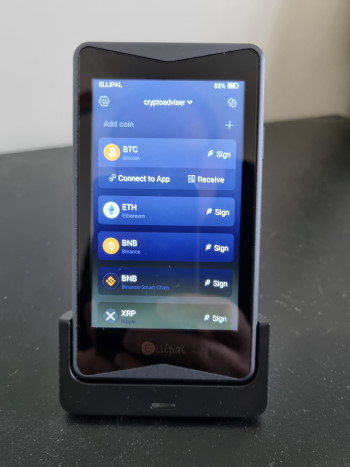
The Titan resembles a small smartphone and has a satisfyingly robust aluminium alloy shell which adds weight to the device and gives it a premium feel.
It sits snuggly into the supplied charging station which also acts as a convenient desk stand for the wallet.
As an added layer of security the Titan features an anti-disassembly/anti-tamper design meaning the device is rendered useless if someone attempts to force it open.
The screen is bright and responsive and there’s no lag when scrolling between windows.
Getting started with the ELLIPAL Titan
The first thing you need to do when you receive your Titan is make sure the firmware is updated.
This involves downloading the latest firmware version onto the supplied MicroSD card using a computer, then transferring the card to the docking station and installing from there.
While this sounds straight forward, it proved to be anything but and there are numerous posts in online forums from people having problems with this stage of the setup.
Briefly, I found the downloaded update just wouldn’t install. Despite following the instructions to the letter, the update would reach 98% each time then fail.
After spending a fair bit of time trawling the internet for an answer and a lot of trial an error, I eventually solved the issue.
How to solve ELLIPAL Titan hardware wallet firmware update issues
The solution to installing the Titan wallet firmware update is as follows:
- Download the update onto the microSD card and unzip it. This contradicts the official ELLIPAL instructions, but bear with me.
- After unzipping the file, recompress it onto the card. You’ll notice that the file size nearly doubles from the original compressed file.
- Leave both the freshly zipped package and the unzipped folder on the card and follow the rest of the update instructions from ELLIPAL.
This worked for me but if you’re still having problems, other people have suggested:
- Using a new microSD memory card (it must be smaller than 32GB).
- Ensuring the Titan docking station is plugged into mains power, as opposed to a laptop for example.
- Perform a new format of the card, ensuring it’s set to FAT32, and quick format is unchecked.
Having this aggravation was annoying and bugs like this need to be ironed out to ensure customers have confidence in the product, especially as pretty much everything else worked seamlessly from this point onwards.
I did contact support before I’d found the solution and they responded quickly, although their solution didn’t work.
After updating the firmware you need to set up an account on the wallet, which includes choosing a password and 12 word mnemonic.
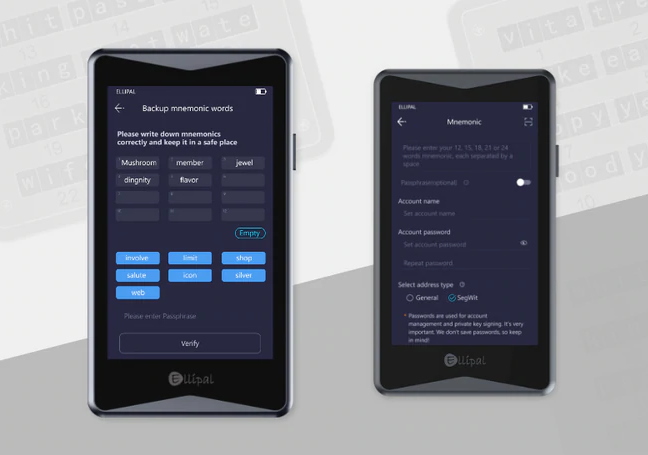
It’s crucial that you keep this information secure – if you lose it you’ll lose your crypto forever.
You then select the coins you want included in the account before pairing the device with the ELLIPAL app which you’ll need to download onto your smartphone.
Part of this process involves using your phone’s camera to scan QR codes on the Titan for each coin you wish to add, or you can set it to cycle through all coins to get them all.
Once done, you’re ready to start sending and receiving your first coins using the ELLIPAL Titan.
Using the ELLIPAL Titan
The Titan works by signing transactions using a QR code. This method ensures it’s completely isolated from the internet and safe from attack by malicious actors.
The private keys are stored on the Titan meaning they will never be exposed to the internet. When you need to sign a transaction the key is encrypted and a QR code is used to confirm it through the app.
Receiving crypto to your cold wallet is as simple as scanning the wallet address QR code from either the hardware wallet or app and initiating a transfer.
Remember, your crypto balance doesn’t show up on the wallet which is a shame as the app can be buggy and often shows a zero balance until restarted.
Sending coins is a more complex process and involves initiating the transaction via the ELLIPAL app then signing it using the wallet through both QR code and password.
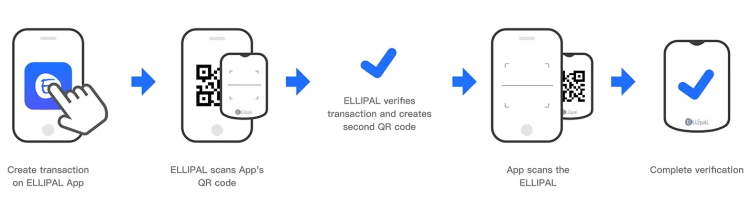
The process of sending coins feels very secure and I certainly felt confident that the device is safe from attack.
Once you’ve completed a couple of transactions on the wallet and become familiar with the method of using QR codes to sign transactions it is actually very easy to use.
I believe it’s a cold storage system that anyone can get the hang of, especially given the large screen and minimalist app.
Other hardware wallets, such as the Trezor, are quite fiddly to use because of their size and the fact that you need to connect them to your smartphone/computer with a cable to use.
However, they are backed by much larger, higher profile companies, while at the moment ELLIPAL feels relatively unknown. This, of course, could change if the product gains traction.
Security features
Security is the number one priority for ELLIPAL.
The security features include:
- Completely air-gapped from the internet, Bluetooth, USB, NFC, WiFi.
- Transaction signing via QR code encrypts your private keys which never leave the device.
- Anti-tamper/anti-disassembly design.
- ‘Trustless Trust’ using a controlled QR code format which is verifiable and transparent.
About the company
ELLIPAL is a technology company located in Hong Kong which offers several products in the crypto security space.
These include the Titan wallet, ELLIPAL Joy mnemonic creator and the Mnemonic Metal – a fireproof back up of your mnemonic phrase.
The company was established in 2016 by David Tian and Tong Chen and bills itself as the leading producer of air-gapped cold wallet storage solutions.
Mining and staking with ELLIPAL app
The ELLIPAL app also acts as a hub for staking coins meaning you can earn a passive income on your crypto.
It also connects you to a selection of DApps, NFT marketplaces, mining pools and a crypto exchange, so you can buy and sell coins via third party providers.
Coins you can stake include:
- Cardano (ADA)
- Cosmos (ATOM)
- Tezos (XTZ)
Other services available through the app include PancakeSwap, SushiSwap, Uniswap, OpenSea and Rarible.
Overall verdict
There’s a lot to like about the ELLIPAL Titan and the completely air-gapped way in which it works is a much needed step forward when it comes to crypto storage security.
As hardware wallets go, it’s one of the best I’ve used and is certainly more accessible than the others on the market with small screens and cables.
The wallet feels very secure, and I’d be quite comfortable using it to store my crypto, especially the coins I intend to hodl for the foreseeable future.
Some users have reported poor battery life, or that they feel the wallet is too big to carry around.
However, I didn’t experience either of these issues: my Titan still had 83% charge after four days of reasonably heavy use while I tested it (I did switch it off between uses), and the device would comfortably slip into your jacket pocket or bag.
If ELLIPAL can iron out the bugs and polish its marketing copy, then it could well become a front runner in the hardware crypto wallet market.
Related links:





Disclaimer: Nothing on this website constitutes financial advice. The information provided is for educational purposes only.