Lost money to a crypto or trading scam? Read this first:

If your losses exceed £3,000 (in the UK) or $10,000 worldwide The Crypto Adviser offers FREE advice on recovering your funds.

>> GET IN TOUCH
Keystone Tablet Plus Review: Secure Your Seed Phrase

If you’ve got cryptoassets in your portfolio and you’re in any way security conscious you’ll have already moved your coins to a place where you control your private keys.
This means taking them off the exchange where you bought them storing them in either a decentralised software wallet app, such as Trust Wallet or Metamask, or a completely air-gapped hardware wallet.
Whichever route you’ve taken, at some point you’ll have been asked to make a note of your seed phrase (often referred to as your mnemonic or recovery seed) – a combination of 12, 18 or 24 words.

As there’s no longer a central platform in charge of your crypto, if you lose access to your wallet and your seed phrase is destroyed your coins are gone forever.
That’s why a number of rugged fireproof, waterproof and blast-proof metal solutions for storing this all important words have hit the market in recent years.
One of these is the Keystone Tablet Plus, from Keystone (formerly Cobo Vault), which is a companion to its innovative hardware wallet range.
DISCLAIMER: Keystone were kind enough to send me a Tablet Plus for the purposes of this review.
Keystone Tablet Plus – at a glance
Key facts:
- Cost: £38 / $49
- Layout: Individual slot for each tile (slot for every four on standard model).
- Material: Fireproof & waterproof 304-grade steel
- Security: 13 screws on each side (5 on standard model)
- Supports: 12, 18 and 24-word BIP39 recovery phrases
- Size: 70 x 105 x 6mm
- Weight: 450g
Unboxing
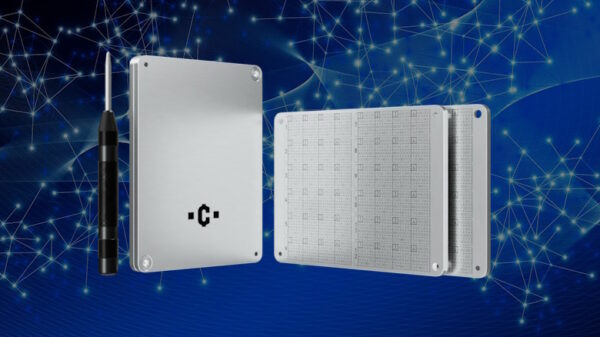
The Keystone Tablet Plus comes neatly packaged with four sheets of metal letters, two tamper-proof stickers, three extra screws for when you inevitably lose one and a Phillips head screwdriver.

Look and feel
The tablet feels weighty and rock solid. If you ever get rid of your crypto stash you could use it as a hammer.
It’s a nicely machined cassette-shaped device and the character panels slide out smoothly ready to be filled with tiles.
It also features a drilled hole to enable you to further secure the tablet with a padlock (not supplied) to prevent some casually sneaking a peak at your seed words.
Using the tablet
First, you need to select the ‘1-12’ panel and remove the securing screws.
Then the tedious part starts – you have to press out the individual letters of your seed phrase from the supplied sheets and add them to the tablet, making sure you double check the words as you go along.
Remember, with BIP39 recovery phrases you only need the first four letters of the word. In cases where you have a three letter word simply reverse one of the letter tiles to add a blank.
The Bitcoin Improvement Proposal 39 (BIP 39) features a list of 2048 words of which the first four letters are unique. Many hardware wallets autocomplete the words as you start typing.
Filling in all the tiles takes a while, especially if you’ve got fat fingers like me, but the individual wells make this process easier and avoids slippage.
One thing I found was that the letter tablets and the frame they’re stamped in have a few sharps edges so watch your fingers. And yes, there was blood!
Once you’ve filled in the first 12 words carefully screw down the securing panel while making sure you don’t dislodge any of the letters.
Make sure you double check all the words are correct before putting in all the screws!
If your recovery phrase has 18 or 24 words in it you need to turn the tablet over and repeat the process.

One thing I wasn’t sure about was the fact the company logo is stamped on the tablet. This wouldn’t matter to a determined thief, but I would have preferred it to be anonymous.
Despite reading criticism of Keystone for not supplying enough characters, at no point did I feel I was going to run out after testing it on two imaginary seed phrases.
How secure is the Keystone Tablet Plus?
Certainly the weight of the tablet makes it feel like a sturdy device, and I can’t image it being damaged easily.
The screws are quite small which could potentially make it susceptible to warping if they’re damaged in a fire, but the multiple fixing points make this unlikely, especially as the panels fit snuggly inside the frame.
Make sure you keep the tablet itself in a secure location because anyone who has access to it could potentially steal your coins.
Overall verdict
The Keystone Tablet Plus is an excellent way of keeping your recovery phrase safe. It feels study, well built and works exactly how it should.
I would have no qualms about using it as my primary seed phrase security method and I feel it rivals anything else on the market right now, especially as it’s relatively inexpensive.
Related links:





Disclaimer: Nothing on this website constitutes financial advice. The information provided is for educational purposes only.